Quick answer
- The current Map Screen goal marker shows a destination, not a route. It is on by default except in Hardcore. The five atlas images below are explicitly pre-remaster Chapter 1 references.
MAP REFERENCE
Open a legacy area map
Choose the exact area, then zoom into the original map markings. Five area images are available.
Pre-remaster Chapter 1 These July 2024 maps predate The Machines of War. Use them only for the legacy chapter1 build; current layouts and pickups may differ. The original “YOU” marker is the author’s captured position, not your live location.
100% fits the whole map. Zoom to inspect its original markings. Drag with a mouse, swipe inside the map, or focus it and use arrow keys.
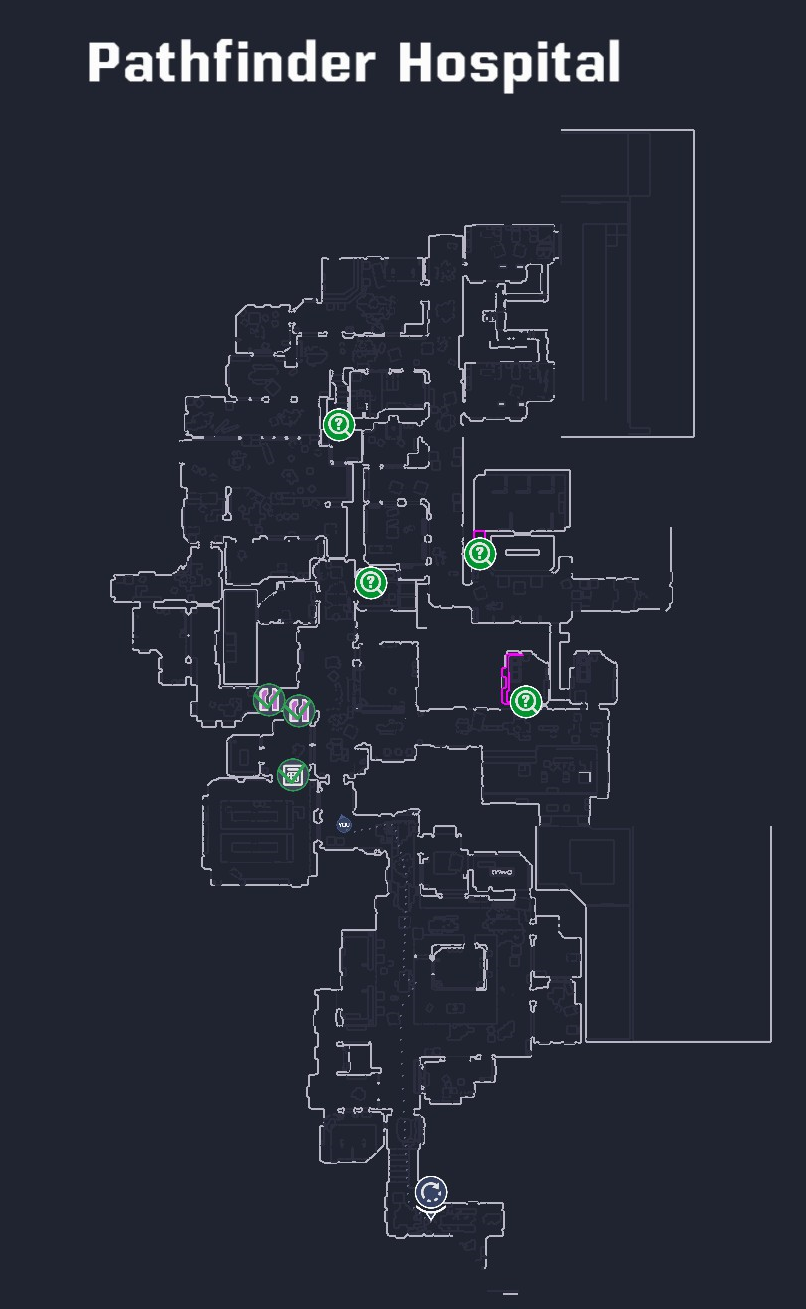
Map image could not load.
Maps by AleksApproves · July 2024. Original in-game markings retained; some cards and datapads are not included.
On this page
01 / A practical check when you are lost
- Open the Map Screen and identify your position, the current area name and the long-term goal marker. Compare them before moving toward another similarly named map.
- If there is no marker, check Gameplay settings. Hardcore always disables it, so an absent marker in that mode is expected.
- Look for switches or detonators already marked after you passed near them. A destination on the far side of a wall is not proof that the nearest door is the route.
- Recommendation: return to the last junction where the route stopped making sense. Recheck nearby progression objects and the green-light guidance described in the campaign walkthrough.
- After an interaction, look for the changed door, passage or route state before leaving. If an old guide’s object is missing, first check whether the guide describes the legacy chapter1 build.
02 / Chapter 1 area index
Use these names to match an old guide to the area you are standing in. Grouping here is for finding the right section of a guide; it is not a verified travel graph, full map count or lock-by-lock route order.
| Region group | Map labels to look for | Use this group for… |
|---|---|---|
| Pathfinder | Pathfinder Hospital; Blue and Orange hospital sections; Pathfinder Labs | Distinguishing hospital sections from the laboratory area. |
| Utility & infrastructure | Utility Area; Rooftop; Outside Streets; Main; Water Treatment; The Broken Seal Bar; Parking Garage | Checking the exact subarea label before following a utility-area clue. |
| City & administration | Selaco Streets; Office Complex; Administration; Courtyard | Separating street exploration from indoor office and courtyard references. |
| Exodus Plaza | Exodus Plaza; North; South; Front Entrance | Matching the named wing or entrance instead of searching the entire plaza. |
| Plant Cloning Facility | Offices and continued office sections | Finding the appropriate facility section in a legacy guide. |
| Starlight | Exterior; Lobby; Red; Green; Purple; Blue | Keeping the lobby and colored areas distinct during optional exploration. |
| Safe-room destinations | Safe Room Extension; Sal’s Lair | Recognizing support-area names instead of mistaking them for an encounter route. |
03 / Legacy example: the switch near Dr. Jones’ door
Only use this example in the pre-remaster Chapter 1 context described by the older secrets guide. The destination is an optional hospital secret, not the main campaign objective. Match the named door and nearby covered panel before trying the sequence.
- Locate Dr. Jones’ door and the nearby switch panel.
- Use melee to knock the green bars off the panel, then activate the switch.
- Go right and crawl through the duct.
- Check the next room for the now half-open door and enter it. The changed door is the result to look for.
- If that panel or room layout does not match your game, stop using this old point-specific route and return to the current Map Screen and progression markers. Do not assume a missing object is a bug.
04 / What the map references cover
The community “Completed Maps” atlas marks many weapon upgrades, secrets, cabinets and supply chests, but explicitly omits some cabinet cards, datapads and security cards. “Completed” in its title does not mean every collectible is accounted for.
The Machines of War adds 19 maps and remasters the original campaign, including item progression changes. This page does not present a complete Chapter 2 floor plan or claim that old collectible positions survived unchanged.
For a missed Weapon Kit in the current build, inspect Requisition in a safe room: it can show the kit’s map and lets you purchase missed kits. That can be a more direct next step than searching every room in an old map image.